Instructions for
Real Estate Analysis Program
Open PropAnal1.exl from CD (assumes Excel program is available). If asked about enabling macros, choose “enable macros”. The display shows groups of data, organized to keep related data together. An example analysis of a Las Vegas property is shown. The green cells either require input from the analyst or should be checked for accuracy by the analyst.
|
|
|
|
INCOME
PROPERTY ANALYSIS SHEET |
|
|
|||
|
Sales
& Loan Info: |
|
2334
Wildcat Road, Las Vegas, NV |
|
|
||||
|
Down: |
24750 |
|
28750 |
Funds
needed to close |
|
|
|
|
|
Cls
Costs |
4000 |
|
|
|
|
|
|
|
|
Points: |
0 |
|
|
|
|
|
|
|
|
Tot
Loans: |
74250 |
Int
Rate |
Yrs |
Pay/Mo |
Pay/Yr |
Interest |
Principal |
|
|
1st: |
74250 |
6 |
30 |
445.17
|
5,342.00
|
4,430.20
|
911.80
|
|
|
2nd: |
|
|
|
|
|
|
|
|
|
3rd: |
|
|
|
|
|
|
|
|
|
Price: |
99000 |
|
|
|
|
|
|
|
|
|
|
Totals: |
|
445.17 |
5342.00 |
4430.20 |
911.80 |
|
|
Gross
Sched Income: |
|
|
Cash
Flow: |
|
|
|||
|
|
|
|
$
per Mo |
$
per Yr |
Gross
Sched Inc: |
14400 |
|
|
|
1 |
Units
@ |
$1,200 |
1200 |
14400 |
Less 1Mo Vacancy |
1200 |
|
|
|
0 |
Units
@ |
0 |
0 |
0 |
Gross
Oper Inc |
13200 |
|
|
|
0 |
Units
@ |
0 |
0 |
0 |
Less Oper Costs |
4400 |
|
|
|
0 |
Units
@ |
0 |
0 |
0 |
Net
Income |
8801 |
|
|
|
0 |
Units
@ |
0 |
0 |
0 |
Less Interest |
4430 |
|
|
|
1 |
|
Totals |
1200 |
14400 |
Taxable
Income |
4370 |
|
|
|
|
|
|
|
|
Less Principal |
912 |
|
|
|
Operating
Costs: |
|
|
|
Cash
Flow |
288.21 |
3459 |
|
|
|
|
|
|
|
|
|
Per
Month |
|
|
|
Property
Tax: |
2.25% |
2228 |
|
|
Depreciation: |
|
|
|
|
Insurance: |
|
444 |
|
|
Sales
Price: |
99000 |
|
|
|
Management: |
7% |
1008 |
|
|
Less Land Value |
32670 |
|
|
|
Advertising: |
|
0 |
|
|
Building
Basis |
66330 |
|
|
|
Maintenance: |
5% |
720 |
|
|
Special
Depr: |
0 |
|
|
|
HOA |
|
|
|
|
Yr
Deprec |
27.5 |
2412 |
|
|
|
Total: |
4400 |
|
|
Pers
Prop (3K/3Yr) |
1000 |
|
|
|
|
|
|
|
|
Total
Depr: |
3412 |
|
|
|
|
With
Appreciation |
|
|
|
|
|
|
|
|
|
Return
on Investment: |
|
Tax
Benefit: |
|
|
|||
|
|
Based
on |
28750 |
Capitalization |
|
Taxable
Income |
4370 |
|
|
|
|
Cash
Flow: |
3459 |
|
Less Depreciation |
3412 |
|
||
|
|
Tax
Benefit: |
-297 |
|
Overflow
Deprec |
958 |
|
||
|
|
Principal: |
|
912 |
|
Tax
Brkt |
31% |
0.31 |
|
|
|
Appreciation |
6% |
5940 |
Appreciation |
Tax
Benefit |
-297 |
|
|
|
|
Total
ROI |
34.83% |
10013 |
6% |
|
|
|
|
|
|
Total
ROI |
31.39% |
9023 |
5% |
Return
on Investment: |
|
||
|
|
Total
ROI |
27.94% |
8033 |
4% |
Based
on |
28750 |
Capitalization |
|
|
|
Total
ROI |
24.50% |
7043 |
3% |
Cash
Flow: |
12.03% |
3459 |
Spendable |
|
|
Total
ROI |
21.05% |
6053 |
2% |
Tax
Benefit: |
11.00% |
-297 |
3161 |
|
|
Total
ROI |
17.61% |
5063 |
1% |
Principal: |
|
912 |
|
|
|
Total
ROI |
14.17% |
4073 |
0% |
Appreciation |
0% |
0 |
|
|
|
|
|
|
|
Total
ROI |
14.17% |
4073 |
|
|
Sales
& Loan Info: |
|
2334
Wildcat Road, Las Vegas, NV |
|
||||
|
Down: |
24750 |
|
28750 |
Funds
needed to close |
|
|
|
|
Cls
Costs |
4000 |
|
|
|
|
|
|
|
Points: |
0 |
|
|
|
|
|
|
|
Tot
Loans: |
74250 |
Int
Rate |
Yrs |
Pay/Mo |
Pay/Yr |
Interest |
Principal |
|
1st: |
74250 |
6 |
30 |
445.17
|
5,342.00
|
4,430.20
|
911.80
|
|
2nd: |
|
|
|
|
|
|
|
|
3rd: |
|
|
|
|
|
|
|
|
Price: |
99000 |
|
|
|
|
|
|
|
|
|
Totals: |
|
445.17 |
5342.00 |
4430.20 |
911.80 |
|
Sales
& Loan Info |
|
|
|
|
|
|
|
|
|
Property
Address: |
518
Barite Canyon Dr., Las Vegas, NV |
|
||||
|
|
|
|
|
|
|
|
|
|
Down: |
24750 |
|
28750 |
Funds
needed to close |
|
|
|
|
Cls
Costs |
4000 |
|
|
|
|
|
|
|
Points: |
0 |
|
|
|
|
|
|
|
Tot
Loans: |
74250 |
Int
Rate |
Yrs |
Pay/Mo |
Pay/Yr |
Interest |
Principal |
|
1st: |
70000 |
6 |
30 |
419.69
|
5,036.22
|
4,176.62
|
859.61
|
|
2nd: |
2250 |
5 |
10 |
23.86
|
286.38
|
108.46
|
177.92
|
|
3rd: |
2000 |
4 |
5 |
36.83
|
442.00
|
73.29
|
368.71
|
|
Price: |
99000 |
|
|
|
|
|
|
|
|
|
Totals: |
|
480.38 |
5764.60 |
4358.36 |
1406.23 |
Next, enter scheduled income in the Gross Scheduled Income
data block. As in the example
below, the number of units and the monthly rent for each unit are entered.
The program then calculates the total monthly income and the total yearly
income.
|
Gross
Sched Income: |
|
|
||
|
|
|
|
$
per Mo |
$
per Yr |
|
1 |
Units
@ |
$1,200 |
1200 |
14400 |
|
0 |
Units
@ |
0 |
0 |
0 |
|
0 |
Units
@ |
0 |
0 |
0 |
|
0 |
Units
@ |
0 |
0 |
0 |
|
0 |
Units
@ |
0 |
0 |
0 |
|
1 |
|
Totals |
1200 |
14400 |
The operating costs must be entered as in the example
below:
|
Operating
Costs: |
|
|
|
|
|
|
|
Property
Tax: |
2.25% |
2228 |
|
Insurance: |
|
444 |
|
Management: |
7% |
1008 |
|
Advertising: |
|
0 |
|
Maintenance: |
5% |
720 |
|
HOA |
|
|
|
|
Total: |
4400 |
All of the values in the Cash Flow data block are entered automatically from data already available. However, you may want to modify the vacancy factor, which is calculated as one month’s rent. The values for Gross Operating Income, Net Income, Taxable Income and Cash Flow are the values as usually defined.
|
Cash
Flow: |
|
|
|
Gross
Sched Inc: |
14400 |
|
|
Less 1Mo Vacancy |
1200 |
|
|
Gross
Oper Inc |
13200 |
|
|
Less Oper Costs |
4400 |
|
|
Net
Income |
8801 |
|
|
Less Interest |
4430 |
|
|
Taxable
Income |
4370 |
|
|
Less Principal |
912 |
|
|
Cash
Flow |
288.21 |
3459 |
|
|
Per
Month |
|
In the Depreciation data block, the program enters the Sales Price, then calculates the
land value at 33 per cent of the Sales Price.
The land value will need to be revised to reflect the values in the
surrounding area. The program subtracts the land value to arrive at a Basis for
depreciation. If there is a special depreciation available, it can be
entered. The program calculates the
straight line depreciation over 27.5 years, as prescribed by the IRS for
residential property at the time of this writing. Of course, a different value can be entered.
Also, a personal property depreciation of $3000 over 3 years is entered
to cover carpets and drapes, which, of course, can be modified
|
Depreciation: |
|
|
|
Sales
Price: |
99000 |
|
|
Less Land Value |
32670 |
|
|
Building
Basis |
66330 |
|
|
Special
Depr: |
0 |
|
|
Yr
Deprec |
27.5 |
2412 |
|
Pers
Prop (3K/3Yr) |
1000 |
|
|
Total
Depr: |
3412 |
|
.The tax benefit of the depreciation is calculated in the
Tax Benefit data block. In the
example below, the tax benefit is actually a loss.
The 31 % tax bracket must be modified to your actual
tax bracket.
|
Tax
Benefit: |
|
|
|
Taxable
Income |
4370 |
|
|
Less Depreciation |
3412 |
|
|
Overflow
Deprec |
958 |
|
|
Tax
Brkt |
31% |
0.31 |
|
Tax
Benefit |
-297 |
|
In the Return on Investment data block, the percentage values are based on the capitalization from the Funds Needed to Close from the Sales & Loan Info data block. The values of Cash Flow, Tax Benefit, and Principal are brought down from previous calculations.
|
Return
on Investment: |
|
||
|
Based
on |
28750 |
Capitalization |
|
|
Cash
Flow: |
12.03% |
3459 |
Spendable |
|
Tax
Benefit: |
11.00% |
-297 |
3161 |
|
Principal: |
|
912 |
|
|
Appreciation |
0% |
0 |
|
|
Total
ROI |
14.17% |
4073 |
|
Some of the values require explanation. The value in G41 (12.03%) represents the usual cash flow percentage. The value in G42 represents the combination of cash flow and tax benefit percentage, or, as I define it, “Spendable” income. The value outside the data block (I42, 3161) dollar value of Spendable income. Note that appreciation is assumed to be zero in this example.
Calculation
with Appreciation
The data block titled With Appreciation – Return on Investment contains data for possible appreciation rates.
|
With
Appreciation |
|
|
|
|
Return
on Investment: |
|
||
|
Based
on |
28750 |
Capitalization |
|
|
Cash
Flow: |
3459 |
|
|
|
Tax
Benefit: |
-297 |
|
|
|
Principal: |
|
912 |
|
|
Appreciation |
6% |
5940 |
Appreciation |
|
Total
ROI |
34.83% |
10013 |
6% |
|
Total
ROI |
31.39% |
9023 |
5% |
|
Total
ROI |
27.94% |
8033 |
4% |
|
Total
ROI |
24.50% |
7043 |
3% |
|
Total
ROI |
21.05% |
6053 |
2% |
|
Total
ROI |
17.61% |
5063 |
1% |
|
Total
ROI |
14.17% |
4073 |
0% |
The bottom line shows the percentage ROI and dollar ROI with zero appreciation, a duplication of the data shown in the Return on Investment data block. Then next line up shows the percentage and dollar ROI for 1% appreciation. This continues up the list for higher appreciations up to 6%.
Calculation at Various Rents
The assumed income could be inaccurate in the present market or market conditions could change, either requiring lowering the rent or possibly raising the rent. To get a feel for the affect of market changes, and assess the risks involved, the program provides a method for calculation ROI and Spendable Income at various rents.
In C14, enter $500 less than the assumed rent or $700 (1200 –500 = 700). Press the enter key, causing a recalculation at this rent value. With the control key held down, press x (cntrl-x). After a short calculation, the program displays a table showing Spendable and ROI at rents from $700 to $1700. Note that the Spendable here is different from the usual Cash Flow because it includes Tax Benefit (a better indication of actual spendable income over a year’s time). The program always calculates using the entered rent and then increases the rent $100 and recalculates. This continues until a total of 10 sets of results have been calculated.
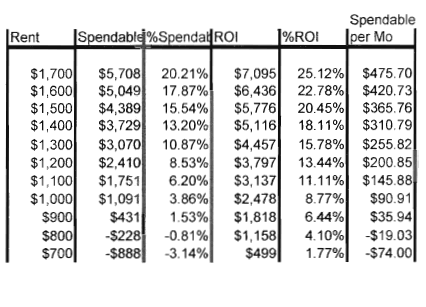
Note that this calculation works only with a single unit. For a multi-unit property, you can “fool the program” by adding all the rents, entering the sum in C14, entering 1 in the A14 and entering 0 in the other A15 through A18. After hitting the enter key, reduce the value of rent in C14 by $500, hit the enter key, and then execute cntrl-x. This will generate the table at various rents.
Printing
Print Page 1 to get a one-page output with all the required analysis data. If the results at various incomes are desired, print Page 2. If you are interested in the monthly interest and principal payments, print Page 3. Page 2 has space available to enter data on comparable sales or listings, if desired.
Good luck with your investments!